Icon of program: Dynamic Clock

Dynamic Clock APK for Android

  • Free
  • 4
    1
  • 43
  • V1.1.0
Free Download for Android

View an ad to download for free

Dynamic Clock: A Gear Fit Collection of Backgrounds

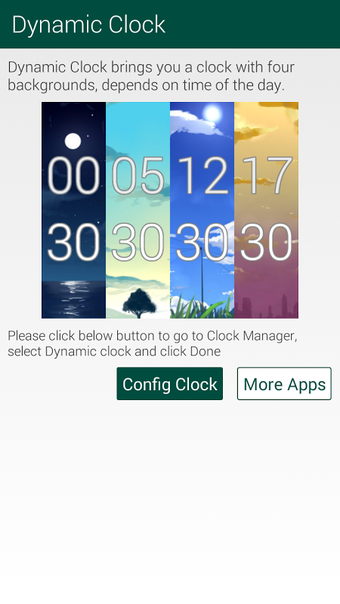
Dynamic Clock for Gear Fit is a free lifestyle app developed by Lee Labs. This app is a collection of great backgrounds that change throughout the day, from dawn to day, dusk, and night. With Gear Fit Dynamic Clock, you can enjoy every moment of your day with a unique and dynamic clock face. The app is available on Android and can be used in both 12-hour and 24-hour modes.

Top Recommended Alternative

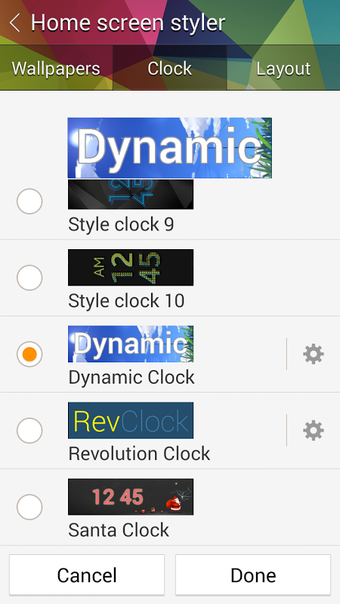
To use Gear Fit Dynamic Clock and select a clock face, you need to install Gear Fit Manager version 1.6 or newer and connect it with your Gear Fit device. After installing the app, go to Gear Fit Manager → Home Screen Styler → Clock tab → Style Clocks and select "Gear Fit Dynamic Clock." With just a few clicks, you can enjoy a new and dynamic clock face on your Gear Fit device.

A special thanks to SwordWaltz for creating these awesome backgrounds and allowing us to use them in our app. Overall, Gear Fit Dynamic Clock is a great addition to your Gear Fit device, providing a unique way to keep track of time throughout the day.
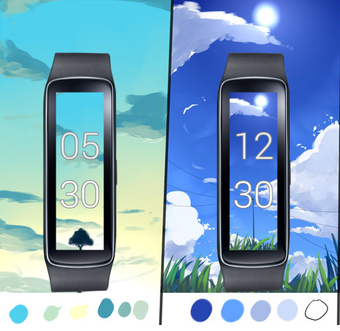
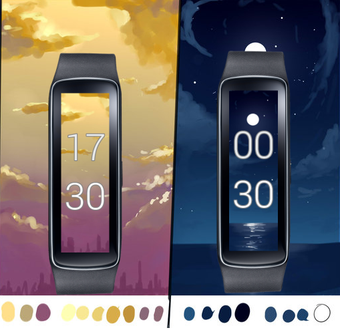
 0/4

App specs

  • License

    Free

  • Version

    1.1.0

  • Latest update

  • Platform

    Android

  • OS

    Android 9.0

  • Downloads

    43

    Last month's downloads

    • 2
  • Size

    2.30 MB

  • Developer

  • Download Options

    APK, Google Play

  • Filename

    com-leelabs-gearfit-dynamicclock-2-9557455-4d531bb6ccbfdd728b4bb7d28341859e.apk

Program available in other languages


Icon of program: Dynamic Clock

Dynamic Clock APK for Android

  • Free
  • 4
    1
  • 43
  • V1.1.0
Free APK Download for Android

View an ad to download for free


User reviews about Dynamic Clock

Have you tried Dynamic Clock? Be the first to leave your opinion!

Add review

You may also like

Explore Apps

Latest articles

Laws concerning the use of this software vary from country to country. We do not encourage or condone the use of this program if it is in violation of these laws.
Softonic

Is Dynamic Clock safe?

100/100

Score result: Clean

This file passed a comprehensive security scan using VirusTotal technology. It is safe to download.

  • Virus free
  • Spyware free
  • Malware free
  • Verified by Security Partners

    VirusTotal logo

Scan Info

Last scan
Wednesday, May 17, 2023
Scan provider
VirusTotal · Full report

File Integrity

File
com-leelabs-gearfit-dynamicclock-2-9557455-4d531bb6ccbfdd728b4bb7d28341859e.apk
SHA256
0aa1adfacb5e72b7255c107049115213f809a366b660c20b31351fb7d148995f
SHA1
9d9d3f4db056d6b739486494920c3713d692aecc

Softonic security commitment

Dynamic Clock has been thoroughly scanned by our advanced security systems and verified by industry-leading partners. This file comes from the official developer and has passed all our security checks, showing no signs of viruses, malware, or spyware. For more information, visit our Security and Trust Center

Softonic

What is a Validated Developer?

Validated Dev

This badge indicates that Softonic has received authorization to offer the software from the developer or a designated representative, through the Softonic Publisher Center or other agreements. Content, ownership and compliance are responsibility of the developer.

More details in terms and conditions.

Are you a developer?

Join the Softonic Publishing Center and reach millions of users.

Not a developer?